

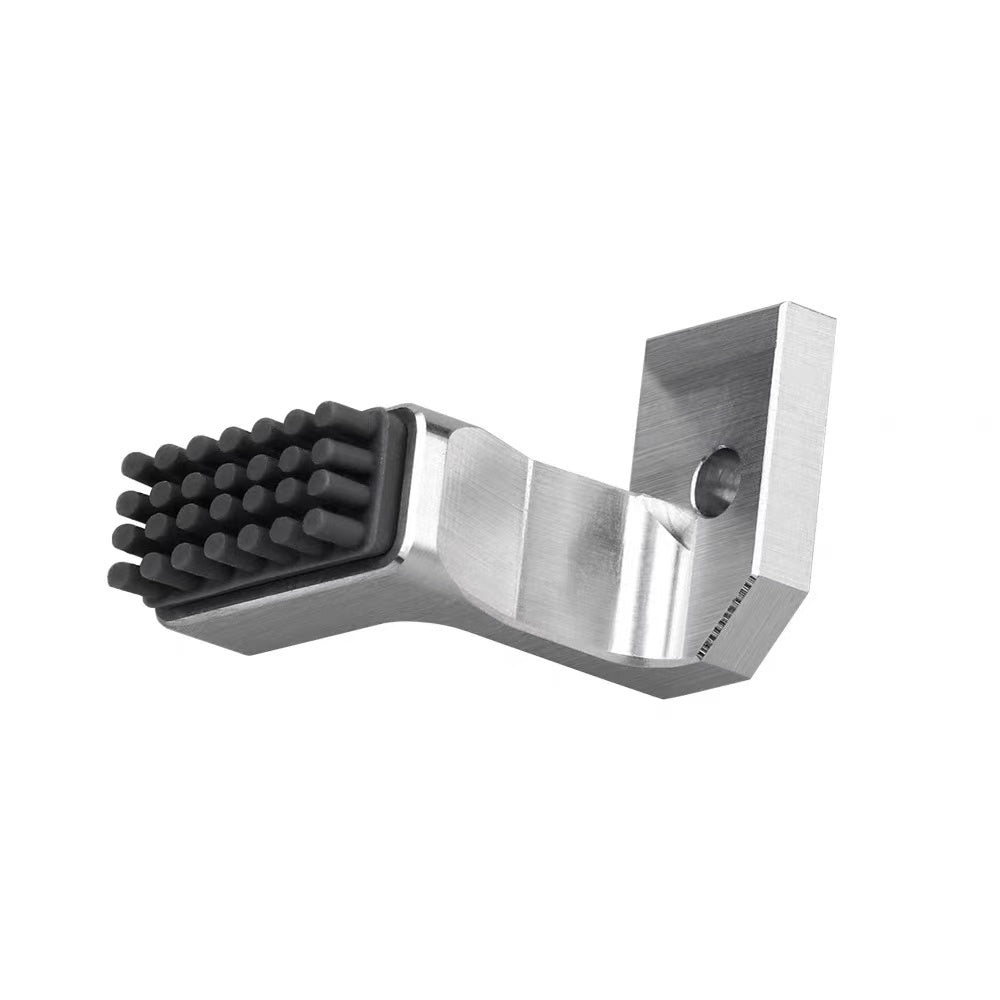
Silicone Brush Nozzle Wiper for Bambu Lab X1 P1 Series - 3D Printer Cleaning Tool
Silicone brush nozzle wiper for Bambu Lab X1, X1 Carbon, P1P & P1S. Heat-resistant, easy replacement. Free DDP shipping.
- $9.99
$8.99- $9.99
- Unit price
- per
Vendor:
Innocube3d
Availability:
In Stock
Subtotal:
$9.99
📦
Free Priority Shipping on ALL Orders!
Order will be shipped out in 1-3 business days once being processed.
Order will be shipped out in 1-3 business days once being processed.
🔒
Secure Checkout
Your payment info is encrypted and secure.
Your payment info is encrypted and secure.


10 customers are viewing this product
Couldn't load pickup availability
Essential Maintenance Tool for Bambu Lab Printers
Keep your Bambu Lab X1 or P1 series printer nozzle clean with this premium silicone brush wiper. Regular nozzle cleaning prevents print defects and ensures consistent print quality.
Key Features
- High-Temperature Silicone - Heat-resistant material withstands nozzle operating temperatures
- Effective Cleaning - Soft bristles remove filament residue without damaging the nozzle
- Universal Fit - Compatible with all Bambu Lab X1 and P1 series models
- Durable Construction - Long-lasting material resists wear and degradation
- Easy Replacement - Simple installation when replacement is needed
Compatibility
- Bambu Lab X1
- Bambu Lab X1 Carbon
- Bambu Lab P1P
- Bambu Lab P1S
Why Regular Nozzle Cleaning Matters
Filament residue buildup on the nozzle can cause print defects including stringing, poor layer adhesion, and inconsistent extrusion. Regular cleaning with this silicone brush ensures optimal print quality and extends nozzle life.
Technical Specifications
- Material: High-temperature silicone
- Temperature Resistance: Up to 300°C
- Compatibility: Bambu Lab X1 and P1 series
- Weight: 0.2kg
Maintenance Recommendation
Clean the nozzle before each print or whenever you notice filament buildup. Replace the brush when bristles show significant wear.
Returns Policy
You may return most new, unopened items within 30 days of delivery for a full refund. We'll also pay the return shipping costs if the return is a result of our error (you received an incorrect or defective item, etc.).
You should expect to receive your refund within four weeks of giving your package to the return shipper, however, in many cases you will receive a refund more quickly. This time period includes the transit time for us to receive your return from the shipper (5 to 10 business days), the time it takes us to process your return once we receive it (3 to 5 business days), and the time it takes your bank to process our refund request (5 to 10 business days).
If you need to return an item, simply login to your account, view the order using the "Complete Orders" link under the My Account menu and click the Return Item(s) button. We'll notify you via e-mail of your refund once we've received and processed the returned item.
Shipping
We can ship to virtually any address in the world. Note that there are restrictions on some products, and some products cannot be shipped to international destinations.
When you place an order, we will estimate shipping and delivery dates for you based on the availability of your items and the shipping options you choose. Depending on the shipping provider you choose, shipping date estimates may appear on the shipping quotes page.
Please also note that the shipping rates for many items we sell are weight-based. The weight of any such item can be found on its detail page. To reflect the policies of the shipping companies we use, all weights will be rounded up to the next full pound.
Will installing this kit void my Bambu Lab A1 warranty?
SwapMod is designed to be non-destructive and fully reversible. It mounts using existing mounting points and does not require cutting wires or modifying the printer’s internal electronics or firmware. Warranty policies can vary by region/provider.
Does it work with the AMS Lite?
Yes. SwapMod operates independently of the filament system, so you can use it alongside AMS Lite for multi-color jobs and continuous batch printing.
Do I need to change the printer firmware?
No. No firmware changes are needed. The system is purely mechanical and triggered by specific G-code movements at the end of a print.
How long does installation take?
Most users can install SwapMod in about 10–15 minutes. A quick installation guide is included.
Is it compatible with the Bambu Lab A1 Mini?
This kit is designed for the standard Bambu Lab A1. Please check our store for A1 Mini compatible products.
What plates work best for reliable ejection?
For best results, start with a clean surface and a reliable first layer. For the highest ejection reliability in continuous printing, a low-drag plate/surface is recommended.


